
User-Centric Design for Privacy and Trust
User-centric design (UCD) prioritizes creating intuitive, easy-to-use products while embedding privacy protections at every stage. Instead of treating privacy as an afterthought, UCD ensures transparency, control, and security for users. Here's why it matters:
- Privacy by Design: Build privacy into the system from the start, not as an add-on.
- Core Principles:
- Data Minimization: Only collect what’s necessary and delete it when done.
- Privacy as Default: Automatically apply the strongest privacy settings.
- Purpose Limitation: Use data only for its intended purpose.
- End-to-End Security: Protect data throughout its lifecycle.
- Transparency Builds Trust:
- Simplify consent processes.
- Clearly explain data use with just-in-time notices.
- Regularly update and communicate privacy policies.
PEPR '25 - UsersFirst: A User-Centric Threat Modeling Framework for Privacy Notice and Choice
Privacy Design Principles
Designing for privacy starts with embedding it right into the foundation of your system. The concept of Privacy by Design (PbD) emphasizes making data protection as integral as functionality itself [1]. By building privacy into the system from the beginning, you ensure that users’ data is respected and protected from the outset.
Several core principles underpin this approach. Data minimization means collecting only the data you absolutely need for a specific purpose - and deleting it once that purpose is completed [1]. Privacy as the default ensures the highest level of protection is automatically applied, so users don’t have to dig through settings to safeguard their information [1]. Purpose limitation restricts the use of data strictly to its stated purpose, with full transparency [5]. Lastly, end-to-end security safeguards data throughout its entire lifecycle, from collection to destruction [1].
These principles address a common user concern: a staggering 80% of Americans believe their data will eventually be used for purposes beyond what was originally intended [1]. By adhering to these guidelines, you not only comply with legal requirements but also foster trust, turning cautious users into loyal advocates.
Collect Only What You Need
When it comes to data collection, less is more. Reducing the amount of data you collect doesn’t limit functionality - it simply ensures intentionality. Before adding any new data field, ask: Is this truly necessary for the service?
One effective strategy is to use attribute claims instead of storing raw sensitive data. For instance, rather than storing Social Security Numbers, you can use a verification service that provides a simple "yes" or "no" response. As the California Privacy Protection Agency states, “Data minimization is a foundational principle in the CCPA” [6]. This approach not only reduces your system’s vulnerability to attacks but also aligns with user expectations.
Another key practice is implementing a strict retention policy. Use automated tools to delete data once its purpose has been fulfilled. This is not just a best practice - it’s required under laws like the Maryland Online Data Privacy Act, which takes effect in October 2025.
Once you’ve minimized data collection, you can reinforce privacy further with technical safeguards.
Technologies That Protect Privacy
Technical protections bring privacy principles to life. Encryption is a must - it protects data whether it’s sitting in storage or moving across networks, ensuring it remains inaccessible to unauthorized parties [1].
De-identification and anonymization are also critical. By removing personally identifiable information, you significantly lower the risk of exposing individual user data. For example, anonymized datasets used for analytics or testing keep sensitive information out of reach. Similarly, strict access controls ensure that only authorized personnel can view sensitive data, while automated deletion policies prevent data from lingering longer than necessary.
How Transparency Builds Trust
::: @figure
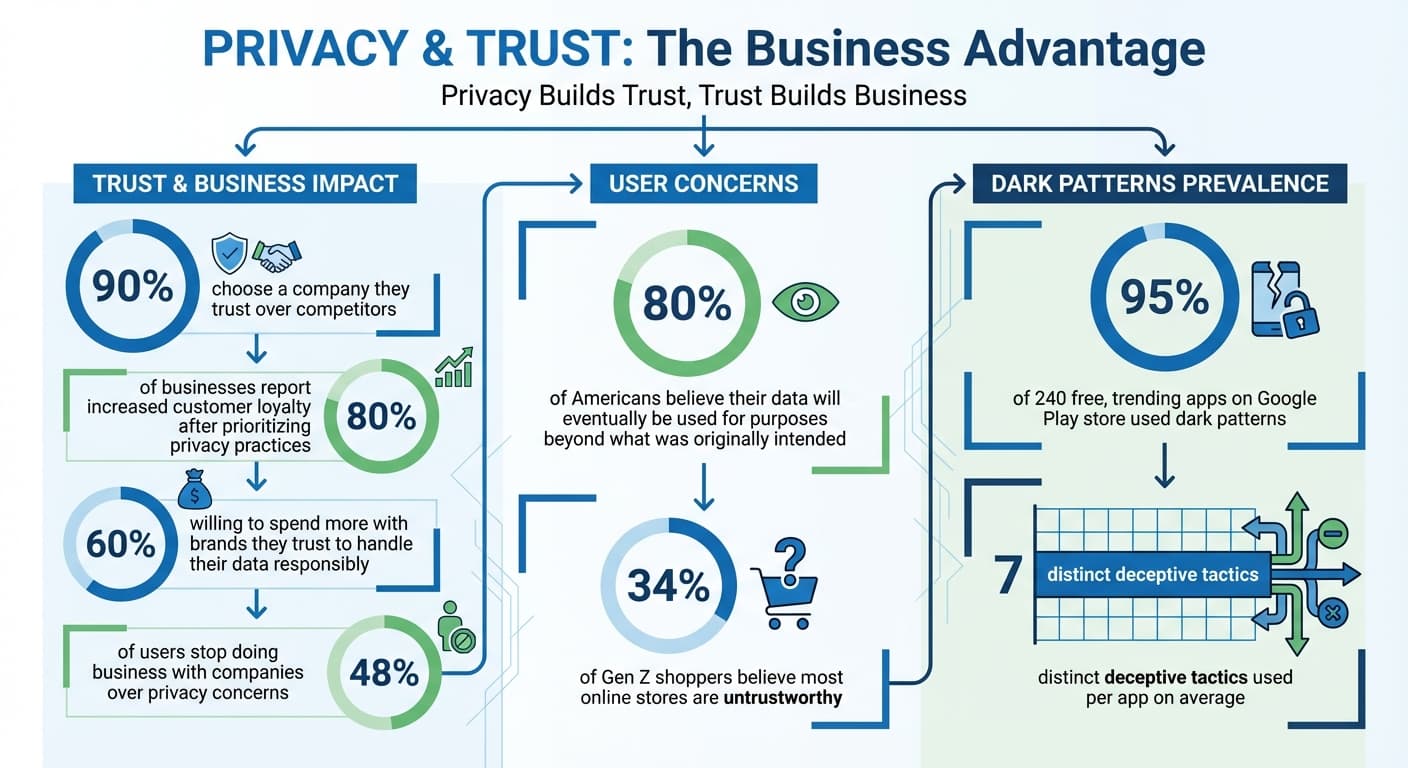
Privacy is about more than just protection - it's about creating a relationship built on honesty and trust. And trust pays off: 80% of businesses report increased customer loyalty after prioritizing privacy practices[13], while 90% of customers say they'd choose a company they trust over competitors[14].
By adopting transparent data practices, companies can go beyond simply meeting legal requirements. They can use openness as a way to connect with customers and build lasting relationships. The Federal Trade Commission emphasizes this point: "Savvy businesses understand the importance of being clear about what you do with [consumer] data"[9]. This clarity lays the groundwork for meaningful consent, which we'll explore next.
Make Consent Easy to Understand
Consent should be straightforward, not a maze of legalese or tricky design choices. Unfortunately, many platforms hide critical details in complex terms or use manipulative design elements. A 2022 European Commission study revealed that dark patterns in digital interfaces can physically stress users, raising their heart rates and anxiety levels[10].
For consent to be valid, it must be specific. For instance, combining requests for personalized ads and analytics into one "accept" button denies users real control[4]. Instead, break these requests into separate, clearly labeled options. If you need location data for navigation and also want to use it for marketing, those should be two distinct choices.
Design also matters. Use a minimum font size of 12 points for readability and ensure strong contrast - like black text on a white background - to reduce misunderstandings[2]. Write in an active voice and keep it conversational, as if explaining your data use to a friend rather than drafting a legal document[2].
Equally important is making it just as easy to say "no" as it is to say "yes." If users can accept with one click, they should be able to decline just as quickly[4][10]. Consider implementing a "one-stop" withdrawal option - like a floating icon or a simple command in the settings menu - to let users revoke consent effortlessly[4]. These practices naturally lead to broader openness, which we'll discuss next.
Be Open About Data Practices
Transparency isn't just a nice-to-have - it's essential. With 48% of users stopping business with companies over privacy concerns and 60% willing to spend more with brands they trust to handle their data responsibly[11], openness becomes a competitive edge.
Be clear about what data you collect, who has access to it, how it's used, and any potential risks[12]. Instead of burying this information in a long, dense privacy policy, use a layered approach: offer a concise summary upfront, with links to more detailed explanations[12].
Timing is also key. Provide just-in-time notices when data is collected. For example, if a user opens a map feature, explain right then why location data is needed[12]. This immediate transparency helps users see the value of sharing their information - they're more likely to agree when they understand the benefits.
"Privacy is a primary concern for modern consumers - people want to know what information websites collect about them and what it's used for." - Termly[11]
Keep your transparency up to date. Update privacy policies whenever your data practices change, or at least annually to comply with regulations like the CCPA[11]. And don't just update quietly - notify users immediately. Proactively sharing changes shows respect for their right to stay informed and strengthens trust.
How to Implement User-Centric Design
Incorporating privacy into your design isn't just about meeting legal requirements - it’s about safeguarding users from the very beginning. This approach is crucial, as highlighted by the increasing demand for privacy-conscious design [1].
The secret lies in embedding privacy into every stage of your process, from initial planning to post-launch [3]. Privacy isn’t a last-minute addition; it should be a core principle from day one.
Before rolling out high-risk features like personalized ads or consent-based models, conduct a Data Protection Impact Assessment (DPIA) [4] [15]. This evaluation helps you pinpoint and address privacy risks early on, preventing issues from escalating. In fact, under the UK GDPR's Article 25, "Data Protection by Design and Default" isn’t just a recommendation - it’s a legal obligation [15].
Once risks are identified, take proactive steps to adjust your system's settings to prioritize user protection right from the start.
Set Privacy-Friendly Defaults
One of the simplest ways to safeguard privacy is by setting default configurations that automatically protect users. As Kadi Coult Wharton, Director of Privacy & Data Governance Content at OneTrust, puts it:
"Privacy as Default ensures [users] don't have to worry about their privacy settings... It automatically sets users' privacy to the highest level of protection, whether or not a user interacts with those settings" [1].
This means disabling all non-essential data processing - like tracking cookies or third-party data sharing - by default [1] [15]. Users should only be tracked or have their data shared if they actively opt in. The UK GDPR reinforces this principle:
"The controller shall implement appropriate technical and organisational measures for ensuring that, by default, only personal data which are necessary for each specific purpose of the processing are processed" [15].
Additionally, enforce strict data retention policies and limit access to personal information [1] [15]. Personal data shouldn’t be accessible indefinitely or to an unrestricted number of people. If you’re relying on consent mechanisms, make them session-based rather than persistent to avoid retaining data longer than necessary [4].
Give Users Control Over Their Data
Empowering users isn’t just about offering settings buried in complex menus. It’s about providing clear, accessible tools to view, modify, and revoke consent [4] [16]. The W3C Privacy Principles emphasize:
"It should be as easy for a person to check what consent they have given, to withdraw consent, or to opt out or object, as to give consent" [16].
Start by offering detailed consent options. Don’t bundle multiple purposes under a single "accept all" button. For example, if you’re collecting data for personalized advertising and content recommendations, let users choose between these independently [4].
Make it simple for users to withdraw consent [4] [16]. If opting in requires a single click, opting out should be just as straightforward. Consider adding a "one-stop" withdrawal feature, such as a visible command in your settings menu or a floating icon. When users revoke consent, treat it as a request for erasure and delete any personal data collected under that consent [4].
Support global opt-out tools like the Global Privacy Control (GPC), which allows users to communicate their privacy preferences across all sites [16]. This addresses what the W3C calls "automation asymmetry", where companies can collect data effortlessly while users must take manual steps to protect themselves [16]. Your system should handle privacy management, rather than shifting the responsibility onto users.
Finally, test your privacy controls with real users. Conduct usability tests to ensure people understand their options and can easily exercise their rights [3] [4]. If users struggle to manage their data, your controls may need refining to be truly effective.
Detect Manipulation in Conversations
Use AI-powered tools to analyze text and audio for gaslighting and manipulation patterns. Gain clarity, actionable insights, and support to navigate challenging relationships.
Start Analyzing NowGaslighting Check: Privacy-Focused Design in Practice

When dealing with sensitive issues like emotional manipulation, protecting user privacy isn't just important - it’s non-negotiable. Gaslighting Check takes this responsibility seriously by incorporating features built around privacy. With strong encryption protocols and automatic data deletion, the platform ensures that users can address manipulation concerns without worrying about their data being exposed.
Encryption and Automatic Data Deletion
Gaslighting Check uses end-to-end encryption to secure all interactions. Whether users are recording calls or analyzing text messages, every piece of data is encrypted the moment it’s collected, ensuring it stays protected.
To further safeguard user information, the platform employs automatic data deletion. Conversation logs and personal details are erased based on strict retention schedules. This proactive cleanup reduces the risk of long-term exposure, keeping sensitive data from lingering unnecessarily.
Secure AI-Powered Analysis
The platform’s AI engine is designed to detect manipulation tactics like blame-shifting and reality denial. It uses voice analysis to assess tone and speech patterns and text analysis to identify specific linguistic markers. Detailed reports are generated from this analysis, but raw data is never stored, maintaining user privacy.
This approach ensures users get actionable insights into manipulation tactics and patterns over time - all while staying in control of their personal data. The real-time audio recording feature processes conversations immediately, providing instant feedback without the need to retain unnecessary data.
Gaslighting Check offers a Premium plan for $9.99 per month, which includes both text and voice analysis, detailed reports, and conversation history tracking. For those testing the service, the Free plan provides basic text analysis. Organizations and therapists can opt for Enterprise plans, which offer customized solutions with advanced privacy protections.
Avoid Dark Patterns
Dark patterns - sometimes called deceptive patterns - are clever design tricks aimed at steering users into making decisions they wouldn't ordinarily choose. These tactics often prioritize a company’s gain over user privacy and trust. A study from the University of Zurich found that 95% of 240 free, trending apps on the Google Play store used dark patterns, with many apps employing an average of 7 distinct deceptive tactics each [17].
Such deceptive designs not only erode user trust but also disproportionately affect those with less digital experience. If you're creating a privacy-first platform, steering clear of these tactics is critical to earning - and keeping - user confidence. By eliminating dark patterns, you demonstrate transparency and build a foundation of trust that lasts.
Identify and Remove Deceptive Tactics
Dark patterns come in many forms, but some of the most common include:
- Forced continuity: Charging users after a free trial ends without a clear warning.
- Sneak into basket: Adding extra items to a shopping cart without the user’s consent.
- Confirmshaming: Guilt-tripping users with phrases like “No thanks, I don’t like saving money.”
Another notorious tactic is the "Roach Motel", where signing up is easy, but canceling is a frustrating maze. The Federal Trade Commission (FTC) has taken a firm stance against such deceptive practices. For example, in September 2022, the FTC called out Age of Learning, Inc. (ABCmouse) for claiming "Easy Cancellation" while actually creating a convoluted process full of promotions and misleading links to deter users from canceling [7][8][18].
To weed out these tactics, conduct a cognitive walkthrough of your platform. Ask yourself: Are users likely to misunderstand their options? Could they feel pressured or spend more than they intended? Above all, make sure canceling a service is just as straightforward as signing up. Avoid pre-selected checkboxes for data sharing and steer clear of confusing double negatives or trick questions.
Practice Ethical Design
Ethical design is about transparency and fairness, which helps build lasting trust. For example, when presenting options like "Accept" and "Reject", ensure both buttons are equal in size, color, and font. Don’t hide fees or critical information in dense, hard-to-read text. In 2022, the FTC accused LendingClub Corporation of misleading users by prominently advertising "no hidden fees" while burying mandatory charges in tooltip buttons and fine print [7].
"Our report shows how more and more companies are using digital dark patterns to trick people into buying products and giving away their personal information. This report - and our cases - send a clear message that these traps will not be tolerated." - Samuel Levine, Director of the FTC's Bureau of Consumer Protection [7]
Use clear, straightforward language instead of emotional manipulation. If a user declines tracking or a subscription, don’t bombard them with repeated pop-ups during the same session. Privacy settings should be easy to locate and adjust, not tucked away in irrelevant menus. When users see that you’re honest about how their data is handled, they’re far more likely to stay loyal. Ethical design choices naturally align with a user-first approach and create a more trustworthy experience overall.
Conclusion
Designing with privacy in mind goes beyond meeting legal requirements - it builds trust by weaving transparency and respect for user autonomy into every stage of the product lifecycle. By prioritizing privacy from the outset, you not only protect data but also strengthen relationships with your users.
The principles highlighted in this guide - like data minimization, transparency, privacy-friendly defaults, and ethical design - show that protecting privacy doesn’t mean compromising functionality. In fact, these elements work hand-in-hand to create products that excel on both fronts. As Kadi Coult Wharton, Director of Privacy & Data Governance Content at OneTrust, puts it, safeguarding customer data becomes “a guiding force in the user experience, taking the same level of importance as functionality” [1]. By eliminating dark patterns and giving users meaningful control over their data, you demonstrate that their trust matters more than short-term wins. This is especially vital for connecting with younger audiences, as 34% of Gen Z shoppers believe most online stores are untrustworthy [19]. Adopting these practices positions your organization as a leader in a privacy-aware marketplace.
Today, privacy isn’t just a legal checkbox - it’s a strategic advantage and a way to stand out in a crowded market [1]. Companies that embrace these principles early are better equipped to thrive in an era where user trust is as valuable as the products themselves. Every step you take to protect user privacy strengthens both your reputation and your competitive edge.
FAQs
What are the advantages of using Privacy by Design in user-focused design?
Incorporating Privacy by Design (PbD) into user-centered design offers numerous benefits. By building privacy protections directly into the design process, organizations can actively reduce the likelihood of data breaches and steer clear of hefty regulatory fines. It also helps meet legal standards, such as GDPR requirements, without the need for costly adjustments down the road.
For users, default privacy settings provide secure and hassle-free experiences without requiring them to navigate complicated opt-in processes. This naturally boosts both trust and satisfaction. On the business side, it enhances brand reputation, strengthens risk management, and creates a competitive advantage. Starting with privacy as a priority also encourages innovation by defining clear rules for data use, resulting in smoother and more reliable interactions with users.
What is data minimization, and how does it improve privacy and security?
Data minimization means gathering, using, and keeping only the data that's strictly needed for a specific purpose. By handling less personal information, the chances of unauthorized access, misuse, or breaches are significantly reduced.
This practice not only boosts privacy and security but also helps build user trust by protecting sensitive details and ensuring their information stays safe.
Why does transparency matter for building trust in digital platforms?
Transparency plays a crucial role in building user trust. It allows people to clearly understand how their data is being collected, used, and safeguarded. When platforms provide straightforward privacy notices, clear consent options, and simple tools for deleting data, users feel more in control and confident in their choices. Without such openness, users may feel misled or lose trust in the platform altogether.
Gaslighting Check embodies this principle of transparency by offering features like encrypted data storage, automatic data deletion, and plain-language explanations of how conversations are analyzed. By focusing on privacy and making controls easy to navigate, the platform fosters trust while delivering a seamless and user-friendly experience.